
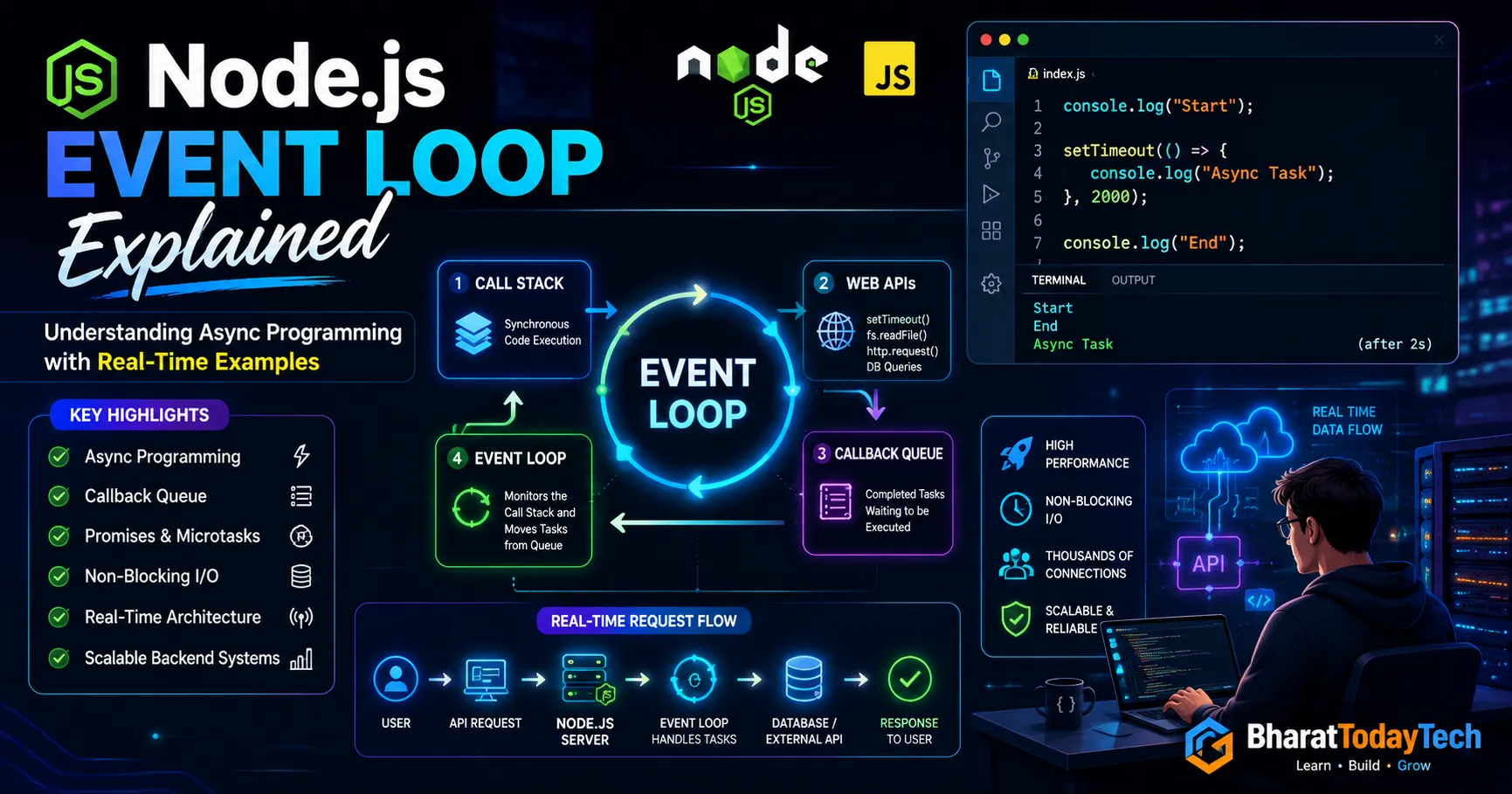

Node.js Event Loop Explained with Real-Time Examples (Complete Beginner to Advanced Guide)
Node.js Event Loop is one of the most important concepts every backend developer should understand deeply.
Many developers use Node.js daily, but very few truly understand:
- How Node.js handles thousands of users
- Why Node.js is non-blocking
- How async code actually works internally
- Why callbacks, promises, and async/await work
In this article, we’ll understand the Node.js Event Loop from beginner to advanced level using real-world examples, production scenarios, and code samples.
What is Event Loop in Node.js?
Node.js runs on a single thread.
But still…
It can handle:
- Thousands of API requests
- Database operations
- File uploads
- Sockets
- Real-time chat
- Streaming
The reason behind this power is:
Event Loop + Non-Blocking I/O
The Event Loop allows Node.js to execute asynchronous operations efficiently without creating multiple threads for every request.
Simple Definition
The Event Loop is a mechanism that:
- Executes synchronous code
- Handles async operations
- Moves completed tasks to callback queue
- Executes callbacks when stack becomes empty
Understanding with a Real-Life Example
Imagine a restaurant waiter.
Traditional Blocking System
A waiter:
- Takes one order
- Cooks food himself
- Serves food
- Then takes next order
Very slow ❌
Node.js Style
The waiter:
- Takes order
- Gives it to kitchen
- Attends other customers
- When food is ready → serves it
Efficient ✅
This is exactly how Node.js works.
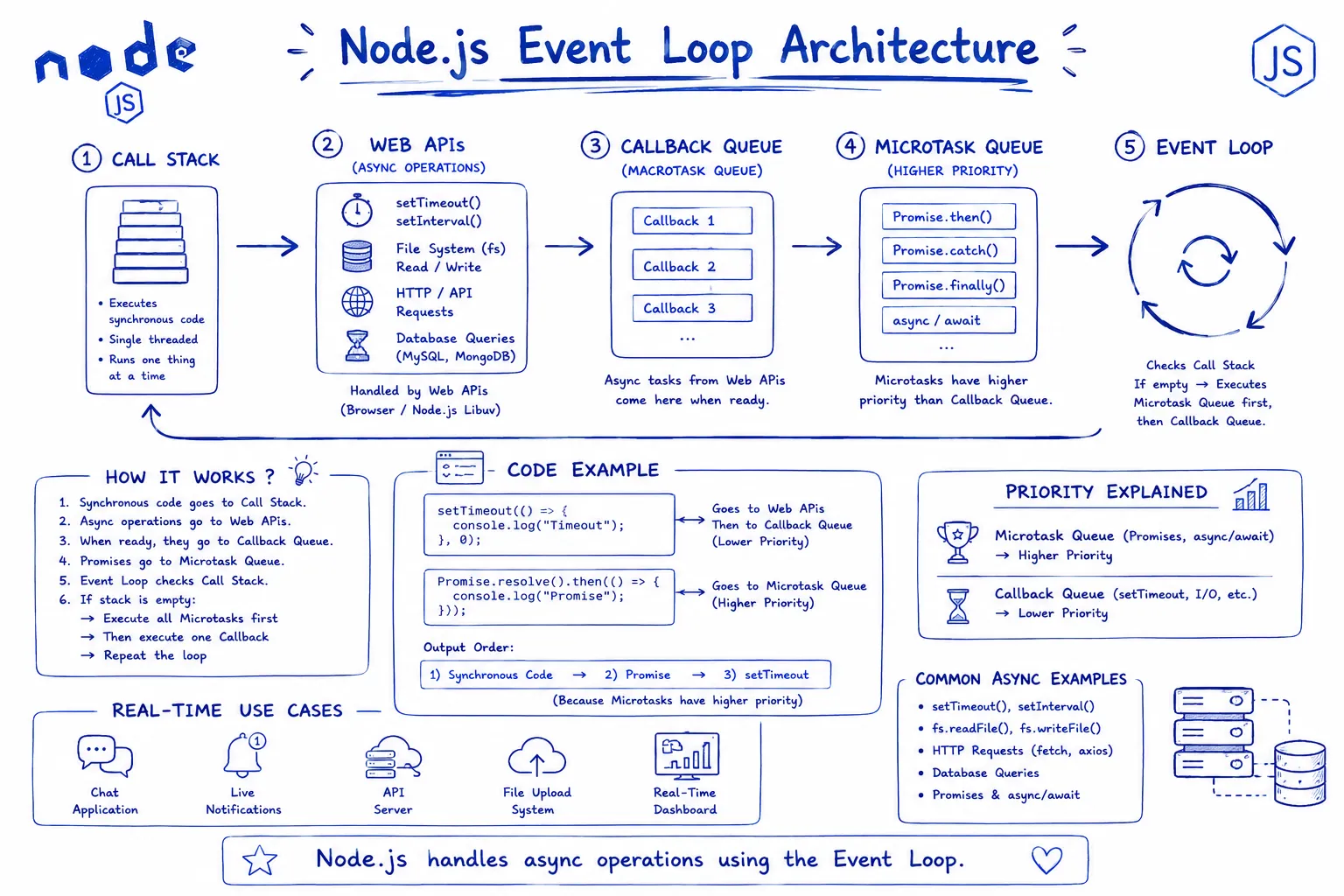
How Node.js Internally Works
Node.js uses:
- V8 Engine
- Call Stack
- Event Loop
- Callback Queue
- Libuv Thread Pool
Basic Flow
Call Stack
   ↓
Async APIs
   ↓
Callback Queue
   ↓
Event Loop
   ↓
Execute Callback
Example 1
Synchronous Code
console.log("Start");

console.log("Middle");

console.log("End");
Output
Start
Middle
End
Example 2 Asynchronous Code
console.log("Start");

setTimeout(() => {
    console.log("Timeout Executed");
}, 2000);

console.log("End");
Output
Start
End
Timeout Executed
What Happened Internally?
Step 1
console.log("Start");
Executes immediately.
Step 2
setTimeout()
Node sends timer task to Web APIs / Libuv.
Step 3
console.log("End");
Runs immediately.
Step 4
After 2 seconds:
- Callback moves to queue
- Event Loop checks stack
- Callback executes
Real-Time Example API Request
const express = require("express");

const app = express();

app.get("/", (req, res) => {

    setTimeout(() => {
        res.send("Data Loaded");
    }, 3000);

});

app.listen(3000);
Node.js registers the timeout and immediately becomes free to handle other incoming requests.
Blocking vs Non-Blocking
Blocking Example ❌
const fs = require("fs");

const data = fs.readFileSync("largefile.txt");

console.log(data.toString());

console.log("Done");
This blocks the entire server.
Non-Blocking Example ✅
const fs = require("fs");

fs.readFile("largefile.txt", (err, data) => {

    console.log(data.toString());

});

console.log("Done");
Output
Done
[file content]
Promise Queue vs Callback Queue
Promises have higher priority.
setTimeout(() => {
    console.log("Timeout");
}, 0);

Promise.resolve().then(() => {
    console.log("Promise");
});

console.log("End");
Output
End
Promise
Timeout
Why Promise Executes First?
Because Promises go to the Microtask Queue, which has higher priority than the callback queue.
Real Production Example Chat Application
Imagine:
- 10,000 users connected
- Messages coming continuously
- Sockets active
Node.js:
- Does NOT create thread per user
- Uses Event Loop
- Handles callbacks asynchronously
This makes Node.js ideal for:
- Chat Apps
- Live Streaming
- Gaming Servers
- Real-Time Dashboards
- Notification Systems
- Socket.IO Applications
Common Mistakes Developers Make
Blocking Code ❌
while(true) {}
This freezes the entire server.
Heavy CPU Operations ❌
for(let i = 0; i < 10000000000; i++) {}
This blocks the Event Loop.
Best Practices for Event Loop
- Always use async functions
- Avoid blocking code
- Use streams for large files
- Use queues for heavy tasks
- Optimize database queries
- Use caching
Interview Questions
What is Event Loop?
The Event Loop is a mechanism that handles asynchronous operations in Node.js.
Why is Node.js Fast?
Because of:
- Non-blocking I/O
- Event Loop
- V8 Engine
Difference between synchronous and asynchronous?
Synchronous code blocks execution, while asynchronous code allows other tasks to continue.
Final Thoughts
Understanding the Event Loop changes how you write Node.js applications.
A beginner writes working code.
An experienced backend engineer writes:
- Scalable code
- Non-blocking architecture
- Production-ready systems
The Event Loop is the heart of Node.js.
Once you truly understand it, concepts like:
- Async/await
- Promises
- Sockets
- Streams
- Queues
- Scalability
become much easier.
Conclusion
Node.js Event Loop is the foundation of modern scalable backend applications.
Whether you are building:
- APIs
- Chat systems
- Live dashboards
- Streaming platforms
- Multiplayer games
Understanding Event Loop is mandatory for every backend developer.
The better you understand it, the better backend engineer you become 🚀