
GitHub Hack Explained: How a Poisoned VS Code Extension Triggered a Massive Supply Chain Attack
The software development world was shaken after reports revealed that GitHub experienced a serious internal security breach linked to a poisoned VS Code extension. According to multiple reports, attackers managed to compromise internal repositories by targeting a developer endpoint instead of attacking GitHub’s core infrastructure directly.
This incident once again proves one important reality:
The developer environment itself has become one of the biggest cybersecurity attack surfaces in modern software engineering.
From VS Code extensions and npm packages to CI/CD pipelines and cloud credentials — attackers are increasingly focusing on the software supply chain.
In this article, we’ll understand:
- What actually happened
- How the attack worked
- Why VS Code extensions can become dangerous
- How supply chain attacks target developers
- Real-world security lessons for engineering teams
- How to protect your Laravel, Node.js, and enterprise projects
What Happened in the GitHub Security Incident?
GitHub confirmed that attackers gained unauthorized access to some internal repositories after compromising an employee's device using a malicious Visual Studio Code extension.
Instead of attacking GitHub servers directly, attackers reportedly targeted the developer workstation itself.
This is extremely important because modern development environments contain:
- GitHub access tokens
- SSH keys
- Cloud credentials
- Production secrets
- Internal repository access
- CI/CD permissions
- Database credentials
Once a developer machine is compromised, attackers can move laterally into internal systems very quickly.
Understanding the Root Cause
The breach was reportedly linked to a poisoned VS Code extension update.
Here’s the dangerous part:
Developers trust extensions every day.
We install:
- Laravel extensions
- Tailwind extensions
- GitHub Copilot
- Docker helpers
- ESLint tools
- Theme plugins
- AI coding assistants
But if even one extension gets compromised, attackers can inject malicious code into thousands of developer systems instantly.
How the Attack Likely Worked
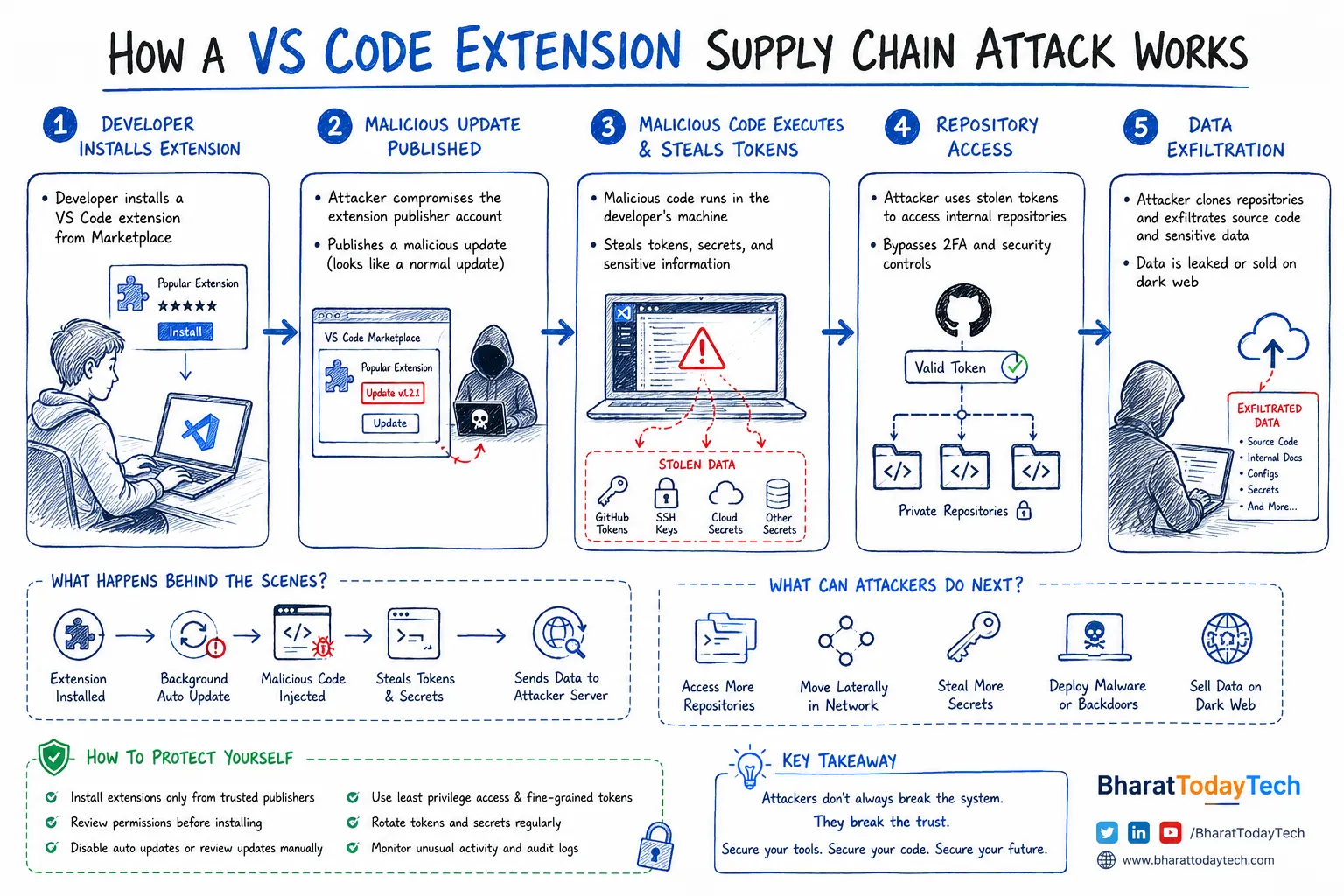
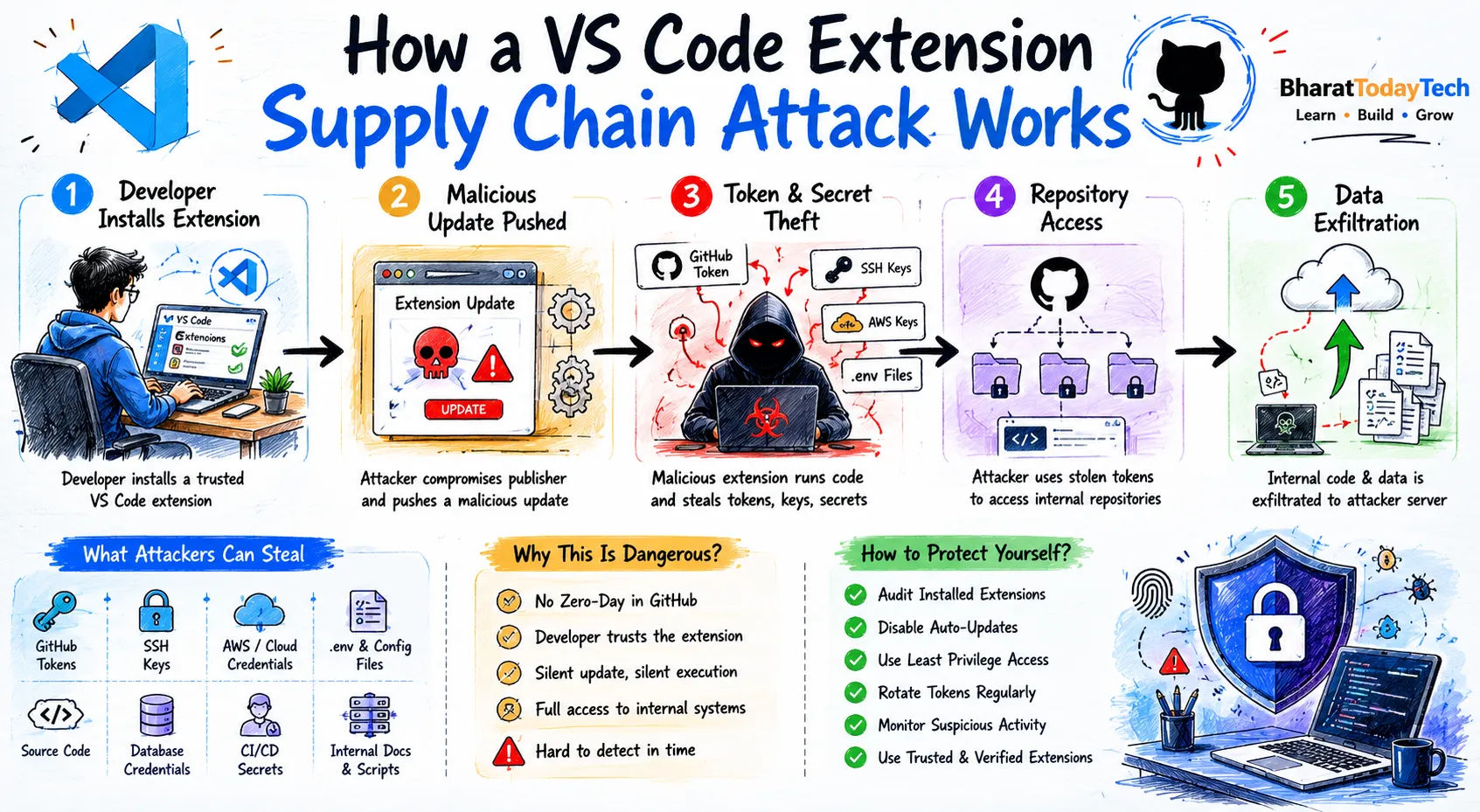
The attack flow was likely something like this:
- A VS Code extension publisher account got compromised
- Attackers pushed a malicious update
- Developers automatically downloaded the update
- The extension executed malicious scripts locally
- Tokens and secrets were extracted
- GitHub repositories were accessed
- Internal source code was cloned
This type of attack is called a:
Software Supply Chain Attack
Because attackers compromise the tools developers already trust.
Why Supply Chain Attacks Are Growing Fast
Modern applications depend heavily on external packages and tools.
A single enterprise application may use:
- Thousands of npm packages
- Composer dependencies
- Docker images
- VS Code extensions
- CI/CD plugins
- Third-party SDKs
Attackers know developers trust these tools blindly.
Instead of breaking hardened servers, it becomes easier to:
- Compromise a package maintainer
- Hijack extension updates
- Inject malicious dependencies
- Steal developer credentials
Why Developer Machines Are High-Value Targets
Developer laptops are incredibly powerful attack entry points.
A single compromised machine can expose:
- Production APIs
- Cloud infrastructure
- Internal dashboards
- Deployment systems
- Source code
- Customer data access
Most companies focus heavily on server security but often ignore local developer environment security.
That is becoming a massive mistake in 2026.
Real-Time Example: How Dangerous This Can Be
Imagine a Laravel SaaS application.
Your developer machine contains:
APP_KEY=
AWS_SECRET=
DATABASE_URL=
STRIPE_SECRET=
GITHUB_TOKEN=
SSH_PRIVATE_KEY=
Now imagine a malicious VS Code extension silently uploads those credentials.
Attackers could:
- Deploy malicious code
- Access production servers
- Clone private repositories
- Steal customer data
- Trigger financial fraud
- Destroy CI/CD pipelines
This is exactly why supply chain attacks are now one of the biggest cybersecurity threats globally.
Why Auto-Updates Can Become Dangerous
Auto-update systems are convenient but risky.
When a malicious extension update gets pushed:
- Thousands of systems may install it automatically
- No manual review happens
- The malicious payload executes instantly
This is why many enterprise engineering teams now:
- Disable automatic extension updates
- Maintain approved extension lists
- Use internal package mirrors
- Restrict plugin installation
How to Protect Your Development Environment
1. Audit Installed Extensions
Remove unused or low-trust extensions immediately.
Especially:
- Low install count plugins
- Unknown publishers
- Unmaintained projects
- Random AI tools
2. Disable Automatic Updates
Manually review important extension updates before installing them.
In VS Code:
Settings → Extensions → Auto Update → Disable
3. Rotate Tokens Regularly
Never keep long-lived GitHub tokens active forever.
Rotate:
- PAT tokens
- SSH keys
- Cloud secrets
- API credentials
4. Use Least Privilege Access
Developers should only have access to what they actually need.
Avoid:
- Admin-level GitHub access
- Production database access for everyone
- Shared root credentials
5. Monitor Developer Endpoints
Modern security isn’t only about servers anymore.
Monitor:
- Extension installs
- Suspicious processes
- Credential access
- Abnormal Git operations
How This Impacts Laravel & Node.js Developers
Laravel and Node.js ecosystems heavily depend on third-party tooling.
Examples:
- Composer packages
- npm modules
- Docker images
- VS Code extensions
- GitHub Actions
A compromised dependency can affect:
- Production deployments
- CI/CD pipelines
- Database migrations
- Application secrets
Laravel Security Best Practices
Laravel developers should:
- Use environment-specific credentials
- Never commit .env files
- Enable secret scanning
- Use GitHub Dependabot
- Review Composer packages carefully
- Restrict production SSH access
Node.js Security Best Practices
Node.js applications are especially vulnerable because npm dependency trees become huge very quickly.
Best practices:
- Use npm audit regularly
- Pin package versions
- Avoid abandoned packages
- Use lock files properly
- Review postinstall scripts
Why This Matters for the Future of AI Development
AI coding tools are increasing rapidly:
- GitHub Copilot
- Cursor AI
- Claude Code
- OpenAI coding agents
- MCP integrations
These tools often require:
- Repository access
- Local filesystem permissions
- Terminal execution
- Cloud credentials
Which means:
The future developer environment will become even more security-sensitive.
Key Lessons from the GitHub Attack
- Developer tools are now attack vectors
- Local IDE security matters massively
- Supply chain attacks are growing rapidly
- Auto-updates can become dangerous
- Least privilege access is critical
- Engineering teams need security awareness
Final Thoughts
This GitHub incident is another reminder that cybersecurity is no longer just about protecting servers.
The developer environment itself is now a primary battlefield.
Modern engineering teams must secure:
- Developer laptops
- Extensions
- Dependencies
- CI/CD systems
- Package managers
- Cloud credentials
Because sometimes the biggest breach doesn’t start from the cloud…
It starts from a simple VS Code extension update.
Frequently Asked Questions (FAQs)
What is a software supply chain attack?
A software supply chain attack happens when attackers compromise trusted tools, dependencies, or extensions used by developers.
How dangerous are VS Code extensions?
Extensions can access local development environments, making them powerful attack vectors if compromised.
Was customer data affected in the GitHub breach?
GitHub stated that customer repositories and enterprise accounts were not affected.
How can developers stay safe?
Audit extensions regularly, rotate credentials, disable unnecessary auto-updates, and monitor developer environments closely.